

This Notion AI review 2026 answers the one question every business owner and solopreneur asks before clicking the upgrade button: is Notion AI worth it for someone running a real business, or is it just a clever feature that sounds better in demos than it performs in daily use?
We used Notion AI inside an active business workspace for 60 days — for meeting notes, content drafts, project summaries, SOPs, client reports, research, and daily task management. We tested every AI feature, hit every limitation, and tracked exactly where it saved time and where it fell short.
This review covers every Notion AI feature in 2026, honest pricing analysis, a direct comparison with ClickUp, and a clear verdict on exactly who should pay the $8 per month upgrade fee and who should skip it entirely.
⚡ QUICK VERDICT — NOTION AI 2026
★ Overall Rating: 4.2 / 5 ★ Best For: Solopreneurs, content teams, knowledge workers, agencies ★ Starting Price: Free (limited) | Notion Plus + AI add-on: $8/month ★ Free Trial: Yes — Notion AI included in free workspace trial ★ Affiliate: Notion Ambassador Programme
VERDICT: Worth it for anyone who already uses Notion as their primary workspace. Not worth it if you only need basic note-taking or project management. 💡 Last Updated: 2026 — all features and pricing verified current. |
What Is Notion AI and How Does It Work?
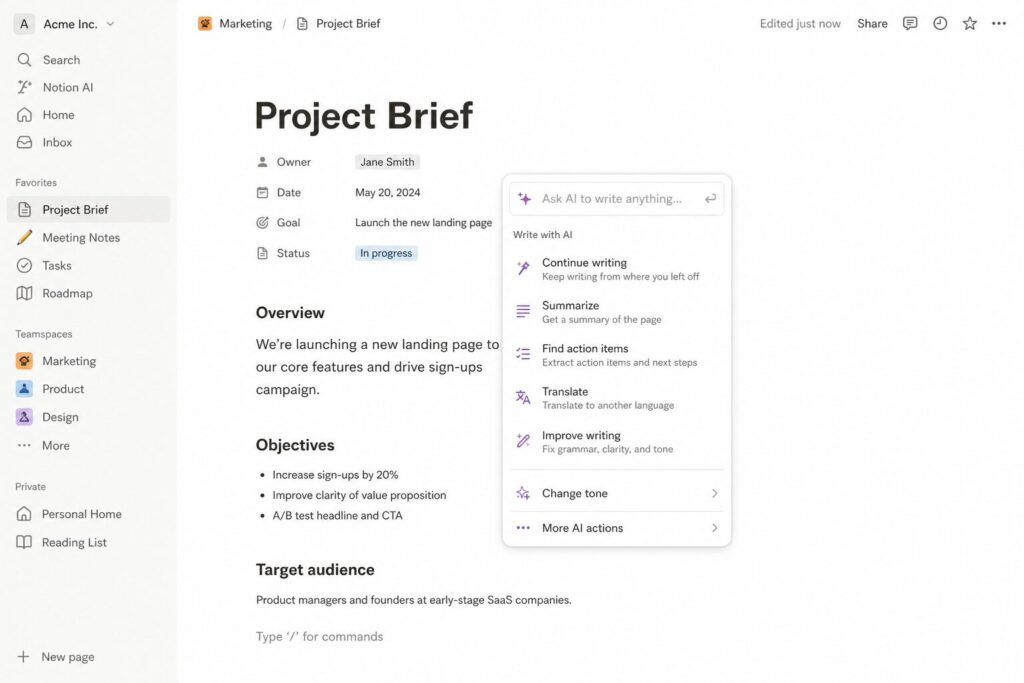 Notion AI is an artificial intelligence layer built directly into the Notion workspace — the popular all-in-one tool that combines notes, wikis, databases, project management, and documents in a single platform. Unlike standalone AI writing tools such as Jasper or Writesonic, Notion AI is not a separate application. It lives inside your existing Notion pages and databases, accessible with a single forward slash command.
The core promise is straightforward: instead of switching between your workspace and a separate AI tool, you ask Notion AI to help you directly inside the document you are already working on. Highlight a paragraph and click ‘Improve Writing’. Open a blank page and click ‘Draft with AI’. Paste a 3,000-word research report and click ‘Summarise’. The AI responds within the Notion interface — no copy-pasting between apps.
In 2026, Notion AI has expanded significantly beyond basic writing assistance. The Q&A feature lets you ask questions about your entire workspace — ‘What did we decide in last Tuesday’s meeting?’ or ‘What is our refund policy?’ — and Notion AI searches across all your pages and databases to find the answer. This turns your entire Notion workspace into a searchable AI knowledge base, which is genuinely valuable for anyone with a large, well-organised workspace.
Notion AI Key Features in 2026
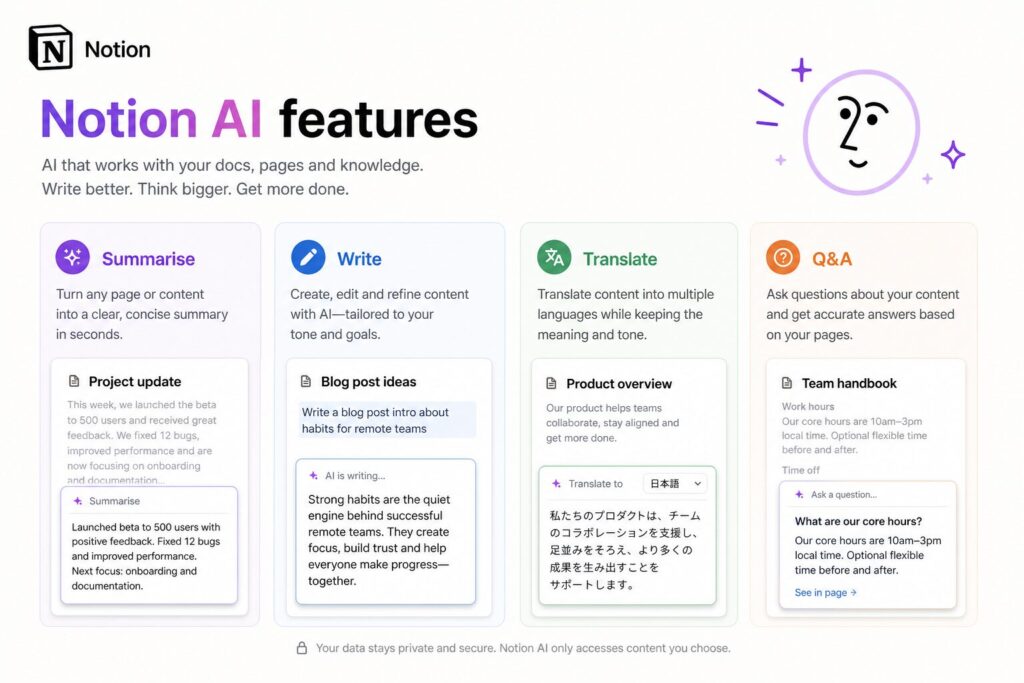 1. AI Writing Assistant
The writing assistant covers the full spectrum of writing tasks inside Notion pages. Draft from scratch, improve existing text, fix grammar, change tone, make content shorter or longer, and simplify complex language. In practice, the writing quality is comparable to a mid-tier AI writing tool — good enough for first drafts, internal documents, and content outlines, but typically requiring editing for anything customer-facing.
Where the writing assistant shines is context-awareness. Because the AI can see the rest of your Notion page, it generates content that is consistent with what you have already written — without you needing to re-explain the topic, product, or audience with each prompt. This saves significant prompt engineering time compared to using a standalone AI tool.
2. AI Summarisation
Paste any long document — meeting transcript, research article, client feedback, support ticket log — and ask Notion AI to summarise it. In our testing this was consistently one of the highest-value features. A 4,000-word meeting transcript became a clean one-page summary with action items in under 30 seconds. A 10-page client brief became a six-bullet executive summary in under a minute.
The summarisation accuracy is high for factual content. It occasionally misses nuanced opinions or inferred priorities in longer documents, so always review the output before sharing a summary with clients or stakeholders.
3. AI Q&A Across Your Workspace
This is the most differentiated Notion AI feature in 2026. Type any question into the AI search bar and Notion AI searches your entire connected workspace — every page, database, doc, and note — to surface the answer. ‘What are our current client deliverable deadlines?’ ‘What was the pricing strategy we agreed in March?’ ‘Where is the brand style guide?’ Questions that previously required five minutes of manual searching return answers in seconds.
The accuracy depends heavily on how well-organised your workspace is. A tidy, consistently-structured workspace produces excellent Q&A results. A messy workspace with inconsistent naming and duplicate pages produces less reliable answers. This feature rewards existing Notion power users significantly more than new users.
4. Translation
Translate any Notion page or selected text into 10+ languages directly inside the workspace. For businesses with international clients or remote teams across multiple countries, this removes the friction of switching to Google Translate or DeepL for routine translation tasks.
5. Meeting Notes to Action Items
Paste raw meeting notes into Notion and ask AI to extract: decisions made, action items assigned, deadlines set, and open questions remaining. In our tests this was consistently accurate and saved approximately 20 minutes per meeting compared to manual note-processing. The output is clean enough to send directly to clients or team members without editing in most cases.
Feature | What It Does | Time Saved (Our Testing) | Quality Rating |
AI Writing Assistant | Draft, improve, reformat text in any Notion page | 8–15 mins per document | ★★★★ |
AI Summarisation | Condense long documents to key points and action items | 20–30 mins per document | ★★★★★ |
Workspace Q&A | Answer questions by searching your entire workspace | 3–8 mins per search | ★★★★ |
Translation | Translate pages or text into 10+ languages | 5–10 mins per translation | ★★★½ |
Meeting Notes → Actions | Extract decisions, actions and deadlines from raw notes | 15–25 mins per meeting | ★★★★★ |
Auto-Fill Database | Generate AI content directly into Notion database fields | 10–20 mins per batch | ★★★★ |
Tone & Style Adjustment | Make text more formal, casual, persuasive or concise | 3–5 mins per edit | ★★★★ |
Notion AI Pricing 2026: What You Actually Pay
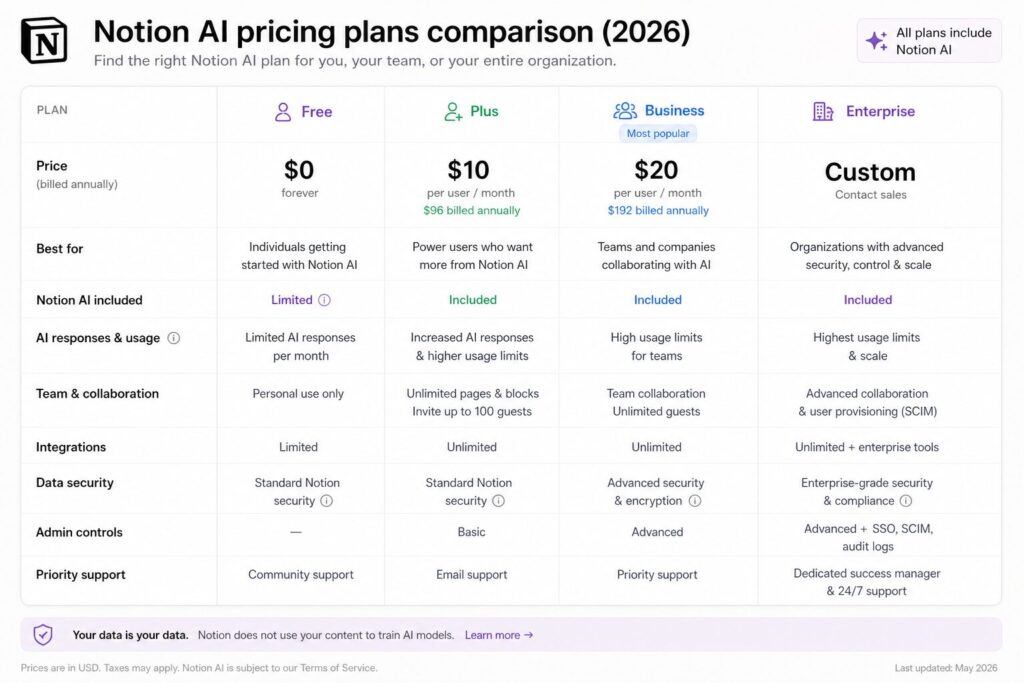
Notion AI is sold as an add-on to your existing Notion plan, not as a standalone product. Here is the complete pricing breakdown for 2026.
Plan | Notion Plan Cost | AI Add-On Cost | Total Monthly | Best For |
Free | $0/month | AI included (limited) | $0 | Testing Notion AI basics |
Notion Plus + AI | $8/month | $8/member/month | $16/month total | Solopreneurs, small teams |
Notion Business + AI | $15/month | $8/member/month | $23/month total | Growing teams, agencies |
Notion Enterprise + AI | Custom | $8/member/month | Custom | Large organisations |
Annual Discount | Save 20% | Save 20% | ~$13/month total (Plus+AI) | Annual commitment |
The honest pricing take: the $8 per month AI add-on is only worth paying if you are already on a paid Notion plan and using the workspace daily. If you are using Notion on the free plan for occasional note-taking, the AI add-on adds more cost than it saves in time. The strongest value case is a solopreneur or small team using Notion as their primary business operating system — in that scenario the AI features pay for themselves within the first week.
Where Notion AI Genuinely Excels
- Workspace context awareness: The single biggest advantage over standalone AI tools. Notion AI understands what you have already written on the page and generates content that fits naturally — without you re-explaining context with every prompt.
- Summarisation at scale: The fastest and most accurate summarisation feature we tested across any AI tool in this price range. Genuinely saves 20–30 minutes per long document.
- Meeting notes processing: Turn messy raw notes into clean action-item lists in under a minute. In our 60 days of testing this was the feature we used most consistently and relied on most heavily.
- Workspace Q&A for organised teams: For teams with a well-structured Notion workspace, the Q&A feature eliminates hours of internal search time per week. Questions that required checking five different pages now return answers in seconds.
- Zero context-switching: Every other AI writing tool requires you to open a separate tab, re-explain your context, copy the output, and paste it back. Notion AI eliminates all four of those steps for every writing task you do inside your workspace.
- Database AI auto-fill: Generate AI content directly into Notion database fields — ideal for content teams maintaining editorial databases, product catalogues, or client records.
Where Notion AI Falls Short — The Honest Limitations
- Long-form content quality ceiling: For articles over 1,000 words, Notion AI’s output quality falls noticeably below dedicated writing tools like Writesonic or Jasper. The content is structurally sound but lacks the depth, research capability, and SEO optimisation that purpose-built content tools provide.
- No SEO integration: There is no keyword density checker, NLP optimisation, or search intent analysis built into Notion AI. You can write content inside Notion but you cannot optimise it for Google without exporting to a separate SEO tool.
- Q&A reliability depends on workspace quality: The Workspace Q&A feature produces excellent results in a clean, well-organised workspace and poor results in a cluttered, inconsistently-structured one. If your Notion is a mess, this feature will disappoint.
- No real-time web access: Notion AI cannot browse the internet or access current information. For research tasks requiring up-to-date data, you still need an external tool with web access such as Chatsonic or ChatGPT with Browse.
- Per-member pricing adds up for teams: At $8 per member per month for the AI add-on, a five-person team pays $40 per month just for the AI layer on top of their Notion plan. Tools like ClickUp AI offer comparable AI features at lower per-seat costs for larger teams.
Notion AI vs ClickUp AI: Which Is Better for Business Owners?
This is the comparison most people researching this Notion AI review want answered — Notion or ClickUp for AI-assisted business management?
Feature | Notion AI | ClickUp AI | Winner |
Primary Use Case | Notes, docs, wikis, knowledge base | Project management, task tracking | Depends on use case |
AI Writing Quality | ✅ Good — context-aware | ✅ Good — task-focused | Tie |
AI Summarisation | ✅ Excellent | ✅ Good | ✅ Notion AI |
AI Task Creation | ⚠ Basic | ✅ Best-in-class | ✅ ClickUp AI |
Workspace Q&A | ✅ Full workspace search | ⚠ Limited | ✅ Notion AI |
Project Management | ⚠ Database-based, flexible | ✅ Purpose-built PM | ✅ ClickUp AI |
SEO Integration | ❌ None | ❌ None | Tie — neither |
Free Plan | ✅ Yes — generous | ✅ Yes — generous | Tie |
AI Pricing | $8/member/month add-on | $5/member/month add-on | ✅ ClickUp AI |
Best For | Knowledge work, content, solopreneurs | Teams, projects, task management | Context-dependent |
Our Rating | ★★★★ (4.2/5) | ★★★★ (4.1/5) | Tie — different strengths |
The honest answer: Notion AI and ClickUp AI serve different primary needs. Notion AI is better for knowledge management, document-heavy workflows, and solopreneurs who live in documents and notes. ClickUp AI is better for team project management, task automation, and businesses where deadlines, assignments and sprint planning drive the daily workflow. Many growing businesses use both — Notion for knowledge and ClickUp for execution.
👉 Try Notion AI free — full workspace trial included → notion.so 👉 Try ClickUp AI free — generous free plan with AI features → clickup.com |
Who Should Buy Notion AI in 2026 — And Who Should Skip It
Buy Notion AI if you are:
- Already a Notion user: If Notion is already your primary workspace, the $8 per month AI add-on has an almost immediate ROI from summarisation and meeting notes alone. The upgrade pays for itself within the first week of regular use.
- A solopreneur or content creator: The writing assistant, summarisation, and Q&A features are perfectly matched to a one-person business that manages a high volume of documents, client work and content inside Notion.
- A knowledge worker or consultant: If your daily work involves processing long documents, extracting insights from research, and maintaining a structured knowledge base, Notion AI is one of the highest-value AI investments available at this price.
- A small agency or content team: Teams that collaborate on documents, briefs, client reports and editorial calendars inside Notion will find the AI features compound in value as the team size grows.
Skip Notion AI if you are:
- A project-management-first team: If your primary need is task tracking, sprint planning and deadline management rather than document-heavy knowledge work, ClickUp AI delivers better PM-specific AI at a lower per-seat cost.
- A blogger needing long-form SEO content: Notion AI cannot replace a dedicated content tool like Writesonic or Jasper for SEO article creation. The output quality ceiling is lower and there is no SEO integration.
- A new Notion user: The Q&A feature — Notion AI’s most powerful capability — only delivers full value with a well-organised, content-rich workspace. New users will get limited value from this feature until their workspace matures.
- A large team on a tight budget: At $8 per seat per month for the AI add-on, a 10-person team pays $80 per month just for the AI layer. ClickUp AI at $5 per seat covers project management AI at lower cost for larger teams.
VERDICT: Based on our 60-day test, this Notion AI review 2026 conclusion is clear — it is worth it for business owners who already use Notion as their daily workspace. The summarisation, meeting notes and Q&A features alone justify the $8/month upgrade. Not worth it if you need long-form SEO content, complex project management, or are new to Notion with an unorganised workspace. |
Notion AI Pros and Cons Summary
Pros ✅ | Cons ❌ |
✅ Context-aware — understands your existing page content | ❌ No SEO integration or keyword optimisation |
✅ Best-in-class summarisation for long documents | ❌ Long-form content quality below dedicated writing tools |
✅ Meeting notes to action items in under 60 seconds | ❌ Q&A quality depends heavily on workspace organisation |
✅ Workspace Q&A searches entire connected workspace | ❌ No real-time web access for current research |
✅ Zero context-switching — AI lives inside your workspace | ❌ $8/seat add-on gets expensive for larger teams |
✅ Database auto-fill saves hours for content teams | ❌ Translation supports 10+ languages — fewer than competitors |
✅ Generous free trial — test AI before paying | ❌ AI writing quality lower than Jasper or Writesonic |
✅ One AI subscription covers all Notion use cases | ❌ Requires existing Notion plan — not standalone |
Frequently Asked Questions About Notion AI
Does Notion AI have a free plan in 2026?
Yes. Notion’s free plan includes limited AI features — enough to test the core writing assistant and summarisation capabilities before committing to the paid add-on. The full AI feature set including Workspace Q&A and unlimited AI usage requires the $8 per member per month add-on.
Can Notion AI write full blog posts?
Yes, but with caveats. Notion AI can draft blog posts of any length, but the output quality for articles over 1,000 words is noticeably lower than dedicated content tools like Writesonic or Jasper AI. For a polished, SEO-optimised blog post, Notion AI produces a useful starting draft but will require significant editing. For internal documents, SOPs and knowledge-base articles, the quality is often sufficient without editing.
How does Notion AI compare to ChatGPT for business use?
They serve very different purposes. ChatGPT is a general-purpose AI you interact with conversationally in a separate browser tab. Notion AI lives inside your workspace and understands the context of the document you are already working on. For tasks that happen inside Notion — drafting pages, summarising documents, extracting action items — Notion AI is faster and more seamlessly integrated. For research, brainstorming outside your workspace, or tasks that require real-time web access, ChatGPT remains the better tool.
Is Notion AI worth it for solopreneurs?
Yes — for solopreneurs who already use Notion daily, the $8 per month AI add-on is one of the most cost-effective AI investments available. The meeting notes, summarisation and Q&A features alone typically save 3–5 hours per week, making the monthly cost recoverable in the first day of use.
What is the best alternative to Notion AI?
ClickUp AI is the strongest alternative for project-management-heavy teams, at $5 per member per month with comparable writing AI features and superior task automation. For knowledge-work teams needing a similar all-in-one workspace, Obsidian with AI plugins offers a more customisable (though less polished) alternative. For pure content creation, Jasper AI or Writesonic deliver higher output quality than either Notion or ClickUp.
Is Notion AI Worth It? Our Final Answer
After 60 days of daily use across real business tasks, the answer is yes — with conditions.
Notion AI is worth every penny of the $8 per month upgrade for business owners and solopreneurs who already live in Notion daily. The meeting notes feature, workspace summarisation, and Q&A capability alone produce time savings that far exceed the monthly cost in the first week of regular use.
It is not the right tool for long-form SEO content creation, complex project management, or teams that do not already have a well-organised Notion workspace. In those cases, a dedicated content tool or a purpose-built project management AI will serve you better.
If you are already paying for Notion and have not turned on the AI add-on, turn it on today. The free trial includes enough AI access to confirm whether it saves you meaningful time. For most daily Notion users, the answer will be obvious within the first three sessions.
Also read: ClickUp AI Review 2026 — Best Project Management AI for Small Business Teams
👉 Try Notion AI free — workspace trial includes AI features → notion.so 👉 Try ClickUp AI free — best alternative for project-led teams → clickup.com |
Last modified: June 16, 2026