

Running a small business means wearing a dozen hats — and most days, there simply aren’t enough hours to wear all of them well. You’re writing emails, posting on social media, chasing invoices, answering customer questions, and somehow trying to find time to actually grow the business. Sound familiar?
The good news is that the best AI tools for small business owners have quietly become good enough to take a huge chunk of that workload off your plate. We’re not talking about clunky automation that breaks every week — we’re talking about tools that genuinely save you 5, 10, even 15 hours every single week.
In this guide, we’ve tested and ranked the top AI tools for small business automation across every major area of your business: writing and content, project management, customer communication, finance, and marketing. Whether you’re a one-person operation or managing a small team, at least three of these tools belong in your business right now.
|
|
 TL;DR — TOP 3 PICKS AT A GLANCE
 Best Overall AI Writing Tool: Jasper AI — saves 5+ hours/week on content
 Best Free AI Productivity Tool: Notion AI — organise your entire business in one place
 Best AI Project Management: ClickUp — automate tasks, deadlines and team updates
1. Jasper AI — Best AI Writing Tool for Small Business Content
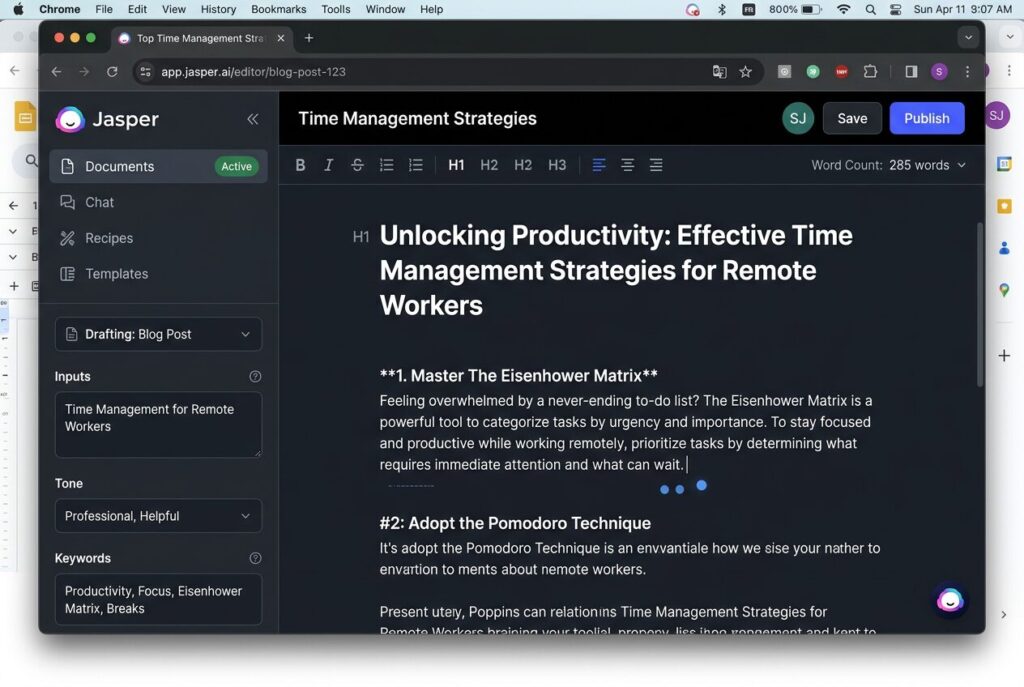
If you create any content for your business — blog posts, emails, social media captions, ad copy, product descriptions — Jasper AI is almost certainly worth the monthly fee. It’s the most popular dedicated AI writing tool on the market for a reason: the output is genuinely good, the templates save enormous setup time, and it integrates directly with SEO tools like Surfer SEO so your content actually ranks.
The thing that makes Jasper different from just using ChatGPT is the business-focused template library. Instead of starting from a blank prompt, you choose a template (“Product Description”, “Email Subject Lines”, “Google Ad Copy”) and Jasper guides you through the inputs. For a business owner who isn’t a professional copywriter, this alone saves hours of figuring out what to actually ask.
What Jasper AI Does for Your Small Business
- Blog posts in 20 minutes: Jasper’s long-form document editor lets you draft a full 1,500-word post with an outline, introduction and body sections — all from a single brief.
- Marketing emails that convert: Paste in your offer details and Jasper writes subject lines, preview text, and body copy that’s been trained on high-performing marketing emails.
- Social media at scale: Generate a week’s worth of Instagram, LinkedIn and Facebook captions in the time it used to take to write one.
- Product descriptions: For e-commerce sellers, Jasper turns a bullet-point feature list into compelling copy with the right tone of voice in seconds.
Detail |
Jasper AI |
Starting Price |
$39/month (Creator plan) |
Free Trial |
7-day free trial |
Best For |
Content creators, marketers, e-commerce |
Key Integrations |
Surfer SEO, Chrome, Google Docs |
Affiliate Commission |
30% monthly recurring |
Pro Tip: Start with the Blog Post template for your first project. It takes under 5 minutes to generate a full draft — then spend 20 minutes editing it into your voice. That’s your entire weekly blog post done.
 Try Jasper AI free for 7 days — no credit card required to start → jasper.ai Try Jasper AI free for 7 days — no credit card required to start → jasper.ai |
2. ChatGPT (OpenAI) — The Swiss Army Knife Every Business Owner Needs
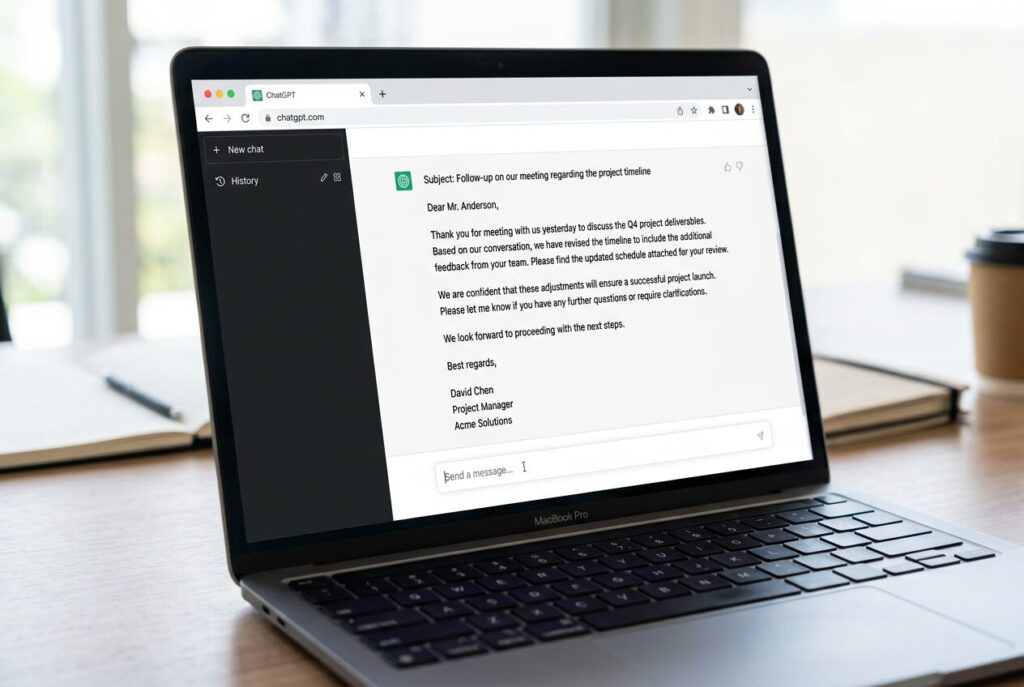
If you haven’t added ChatGPT to your daily workflow yet, this is your sign. It’s not just a chatbot — for small business owners, it functions as an on-demand copywriter, researcher, strategist, and customer service script writer all in one. The free tier is genuinely capable, and ChatGPT Plus at $20 per month unlocks GPT-4o, which handles complex business tasks considerably better.
The key to getting value from ChatGPT is learning how to give it good instructions. The difference between a mediocre output and a genuinely useful one often comes down to a single sentence of context. Tell it who you are, who you’re writing for, what tone you need, and what you want it to produce. Do that consistently and ChatGPT becomes one of the most valuable tools in your business.
Best Uses of ChatGPT for Small Business Owners
- Draft and reply to emails: Paste in a tricky customer email and ask ChatGPT to draft a professional, warm response. Takes 30 seconds.
- Market research on demand: Ask it to summarise the competitive landscape for your niche, list your competitors’ strengths and weaknesses, or explain customer pain points for your target audience.
- Create business templates: Invoice email templates, meeting agenda formats, onboarding checklists, employee handbooks — ChatGPT drafts all of these faster than you can search for a free template online.
- Brainstorm and problem-solve: Describe a business challenge you’re stuck on and ask for 10 possible approaches. You won’t use all of them, but you’ll almost always find one that works.
Detail |
ChatGPT |
Starting Price |
Free | Plus: $20/month |
Free Tier |
Yes — genuinely useful |
Best For |
All-purpose business assistant |
Key Feature |
GPT-4o, custom instructions, plugins |
Works Best With |
Jasper AI, Grammarly, Notion |
3. Grammarly — AI Writing Assistant That Makes Every Word Count
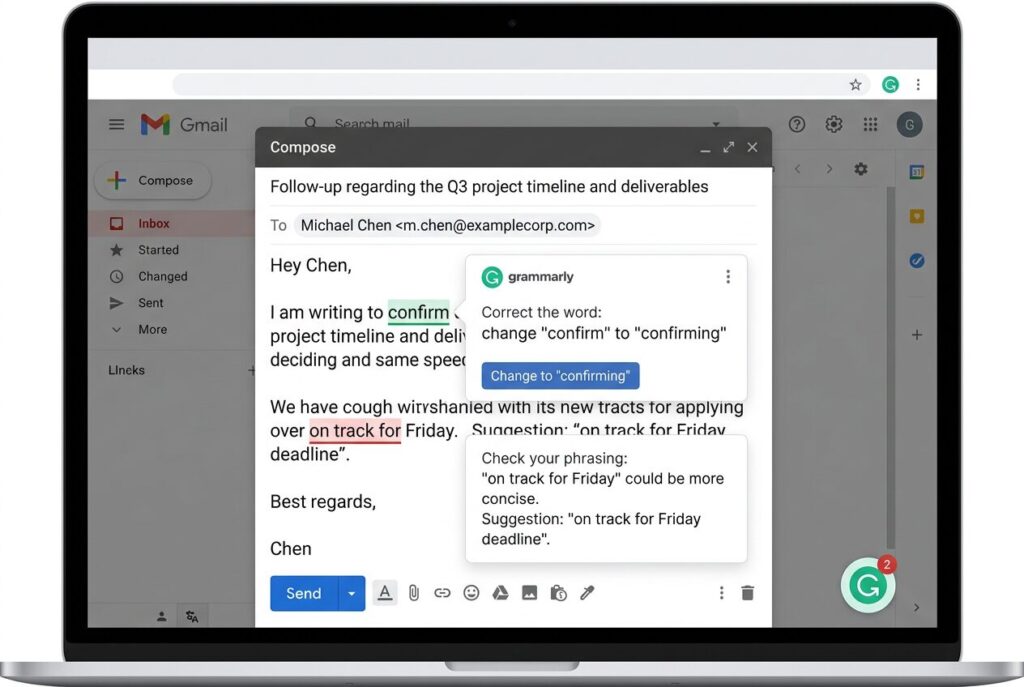
Grammarly has quietly evolved from a spell-checker into a genuinely intelligent AI writing assistant. The free version catches grammar and spelling mistakes, but the Business tier does something much more valuable: it analyses your writing for tone, clarity, and persuasiveness — and suggests rewrites that actually improve how you come across to clients, prospects, and suppliers.
For a small business owner, this matters more than most people realise. Every email you send is a reflection of your brand. A poorly worded proposal or a passive-aggressive follow-up email can cost you a client. Grammarly’s AI rewrites catch those moments before they happen.
Where Grammarly Saves Small Business Owners the Most Time
- Client emails and proposals: Grammarly’s tone detector flags when your writing sounds frustrated, unprofessional or unclear — and suggests alternatives before you hit send.
- Social media and blog posts: The browser extension works inside most content tools, catching errors as you write without switching apps.
- Team communications: The Business plan lets you set a consistent brand voice, so every team member’s writing sounds like it comes from the same company.
Detail |
Grammarly |
Starting Price |
Free | Premium: $12/month | Business: $15/member/month |
Free Tier |
Yes — basic grammar and spelling |
Best For |
Solopreneurs, small teams, client-facing businesses |
Key Feature |
Tone detector, brand voice, full-sentence rewrites |
Works Best With |
Gmail, Google Docs, Jasper AI, Notion |
4. Notion AI — The All-in-One Business Brain for Solopreneurs and Small Teams
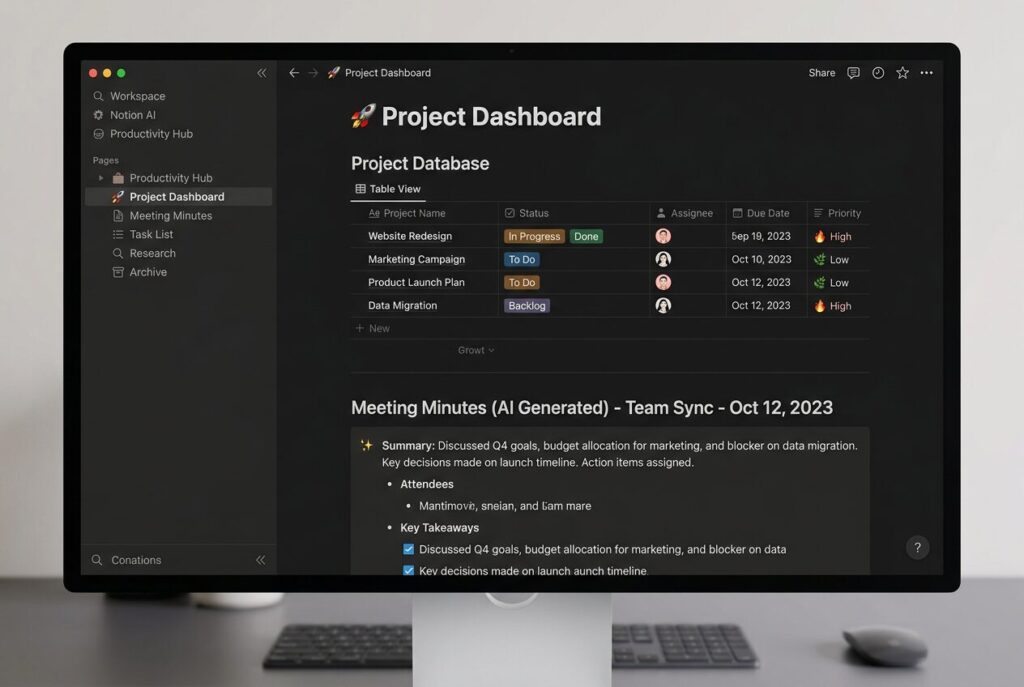
Notion AI takes what was already the best all-in-one workspace for small business owners and makes it even more powerful. The core idea is simple: instead of jumping between a notes app, a project manager, a CRM, a wiki, and a calendar, you run your entire business from one Notion workspace. The AI layer on top means you can ask questions about your own data, generate content, summarise long documents, and turn meeting notes into action items — all without leaving the app.
Take Maya, who runs a six-person digital marketing agency. Before Notion AI, she was manually compiling client reports from scattered Google Docs, emails and spreadsheets. Now she has a Notion database that tracks every client, every campaign, and every deliverable. When a client asks for an update, she asks Notion AI to summarise the last 30 days of activity for that client — and has a professional update ready in under two minutes.
What Notion AI Can Automate for Your Small Business
- Meeting notes to action items: Paste raw meeting notes and ask Notion AI to extract decisions made, actions assigned, and deadlines set. It’s surprisingly accurate.
- SOP creation: Describe a business process and ask Notion AI to format it as a step-by-step standard operating procedure, complete with checkboxes.
- Content drafting: Write blog outlines, email drafts, and social captions directly inside your content database, without switching to a separate tool.
- Summarise documents: Drop in a long contract, research report, or proposal and ask Notion AI for a plain-English summary of the key points.
Detail |
Notion AI |
Starting Price |
Free | Plus: $8/month | AI add-on: $8/member/month |
Free Tier |
Yes — limited blocks |
Best For |
Solopreneurs, agencies, remote teams |
Key AI Feature |
Summarise, translate, action-item extraction, content drafting |
Works Best With |
Slack, Zapier, Google Calendar, Figma |
Internal Link: Read our full Notion AI Review — is it worth the upgrade for small business owners?
5. ClickUp AI — Project Management That Runs Your Team For You
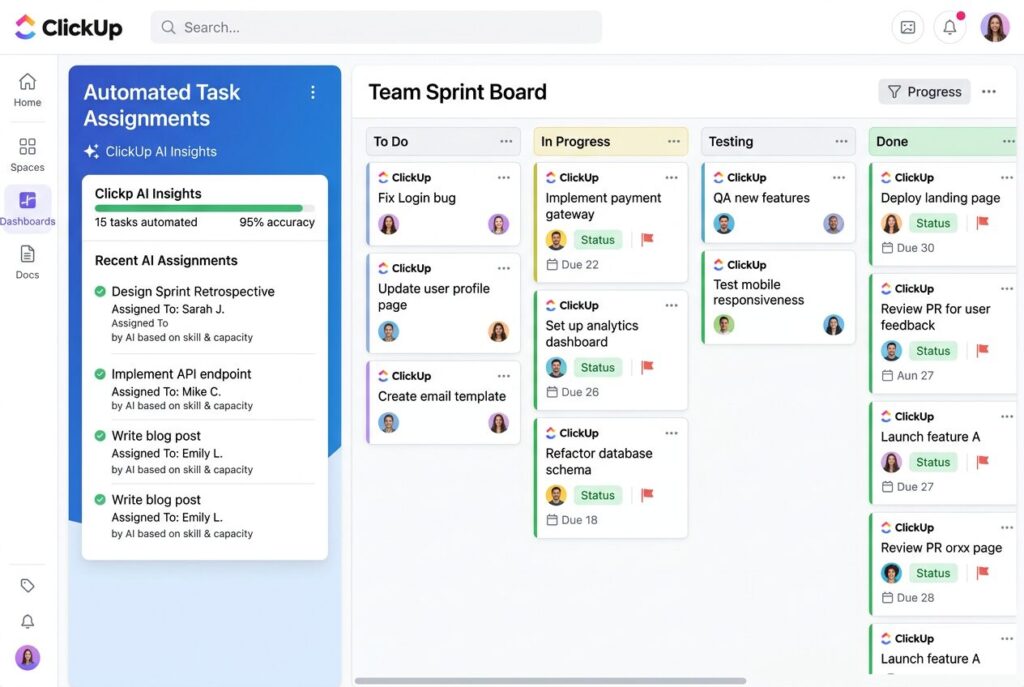
ClickUp is one of those tools that sounds too good to be true until you actually use it. The pitch: manage every project, task, goal, and document in one place, with AI that writes task descriptions, summarises progress, generates SOPs, and even predicts which tasks are at risk of missing their deadline. For a small business owner trying to keep a team organised without hiring a project manager, this is genuinely transformative.
ClickUp AI specifically shines in two areas. First, it eliminates the most time-consuming admin in project management — writing task briefs, creating checklists, setting up sprint templates — by generating these in seconds from a simple description. Second, it keeps your team accountable through automated check-ins and smart reminders, so you spend less time chasing people for updates.
ClickUp AI Features That Save the Most Time
- AI task creation: Describe a project goal in plain English and ClickUp AI breaks it down into subtasks, assigns categories, and suggests deadlines automatically.
- Automated status updates: Set up rules so ClickUp automatically notifies the right people when a task moves from In Progress to Review — no manual updates needed.
- Meeting summaries: ClickUp AI transcribes and summarises meeting notes, then creates follow-up tasks automatically.
- SOP generation: Describe a business process and ClickUp AI formats it as a checklist-based SOP that your team can follow and mark off as they go.
Detail |
ClickUp AI |
Starting Price |
Free | Unlimited: $7/month | AI add-on: $5/member/month |
Free Tier |
Yes — generous free plan |
Best For |
Teams, agencies, growing businesses |
Key AI Feature |
Task creation, SOP generation, progress summaries |
Works Best With |
Slack, Zapier, Google Drive, Notion |
| Try ClickUp free — manage your first project today → clickup.com |
6. Canva AI — Professional Design Without a Designer
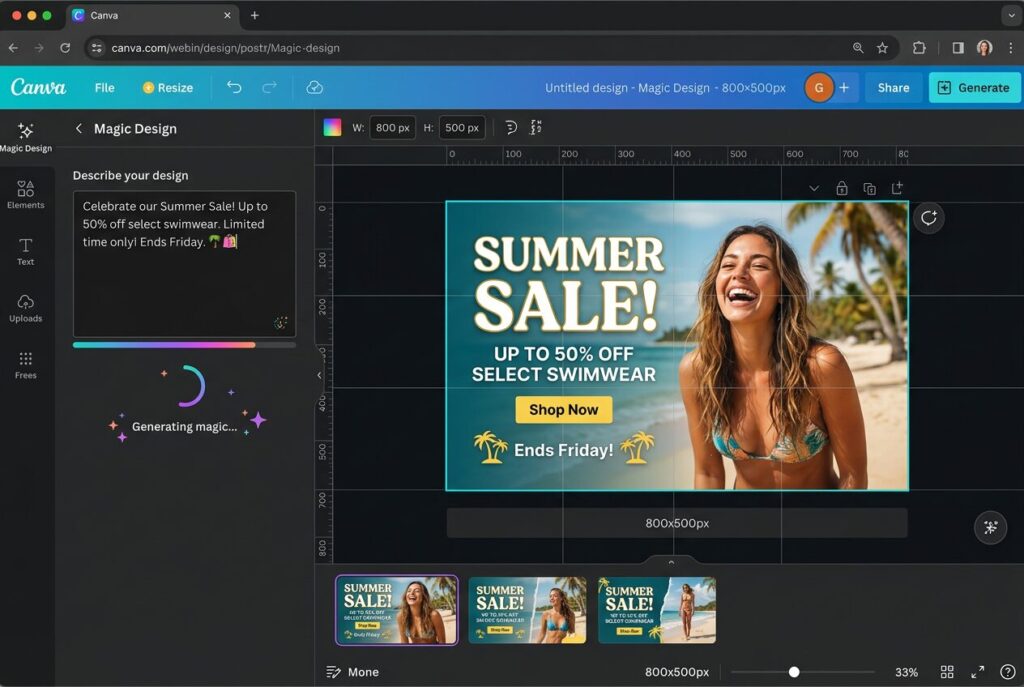
Canva has been the go-to design tool for non-designers for years, and the AI features added in 2024–2025 have made it even more powerful for small business marketing. Magic Design generates complete, on-brand templates from a text prompt. Magic Write drafts captions, headlines and ad copy inside the canvas. The AI background remover and image generator mean you can create professional-looking product photos, social posts, and presentation slides without outsourcing to a designer.
For a small business spending $100–300 per month on freelance design work, Canva Pro at $13 per month is one of the most obvious ROI improvements available. The AI features alone — particularly the brand kit that applies your colours, fonts and logo to any template instantly — eliminate the most time-consuming parts of creating marketing materials.
Detail |
Canva Pro |
Starting Price |
Free | Pro: $13/month |
Free Tier |
Yes — excellent free tier |
Best For |
Social media, presentations, marketing materials |
Key AI Feature |
Magic Design, Magic Write, AI image generation, background remover |
Works Best With |
Hootsuite, Jasper AI, HubSpot, Shopify |
7. Zapier — Connect Your Tools and Automate Without Writing Code
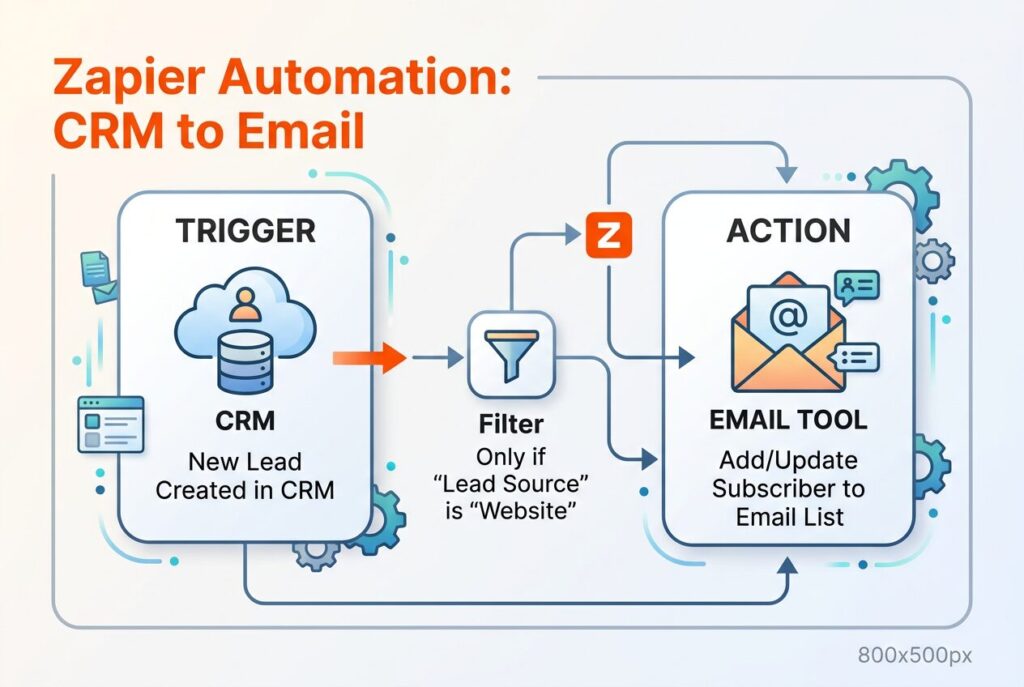
Zapier is the glue that holds your AI tool stack together. On its own, each tool you use operates in a silo — your CRM doesn’t talk to your email tool, your form submissions don’t automatically create tasks in ClickUp, and new customer sign-ups require manual follow-up. Zapier fixes all of that by letting you create automated workflows (called Zaps) that trigger actions in one tool based on events in another.
The AI layer Zapier added means you can now build workflows in plain English rather than configuring them manually. Describe what you want to automate — “When a new lead fills in my contact form, add them to my Mailchimp list and create a follow-up task in ClickUp” — and Zapier AI builds the workflow for you.
The 5 Zapier Automations Every Small Business Should Set Up First
- New form submission → add to email list + create CRM contact automatically
- New customer payment → send welcome email + create onboarding task in ClickUp
- New Google review → notify team in Slack + log in tracking spreadsheet
- New social mention → add to monitoring dashboard + flag for response
- Invoice paid → update accounting records + send thank-you email
Detail |
Zapier |
Starting Price |
Free | Starter: $19.99/month |
Free Tier |
Yes — 100 tasks/month, 5 Zaps |
Best For |
Connecting multiple tools, automating repetitive workflows |
Key AI Feature |
AI Zap builder, natural language workflow creation |
Works Best With |
ClickUp, HubSpot, Mailchimp, Notion, Shopify |
Internal Link: Read our step-by-step guide: How to Set Up Your First Zapier Automation
8. Tidio — AI Customer Service That Never Sleeps
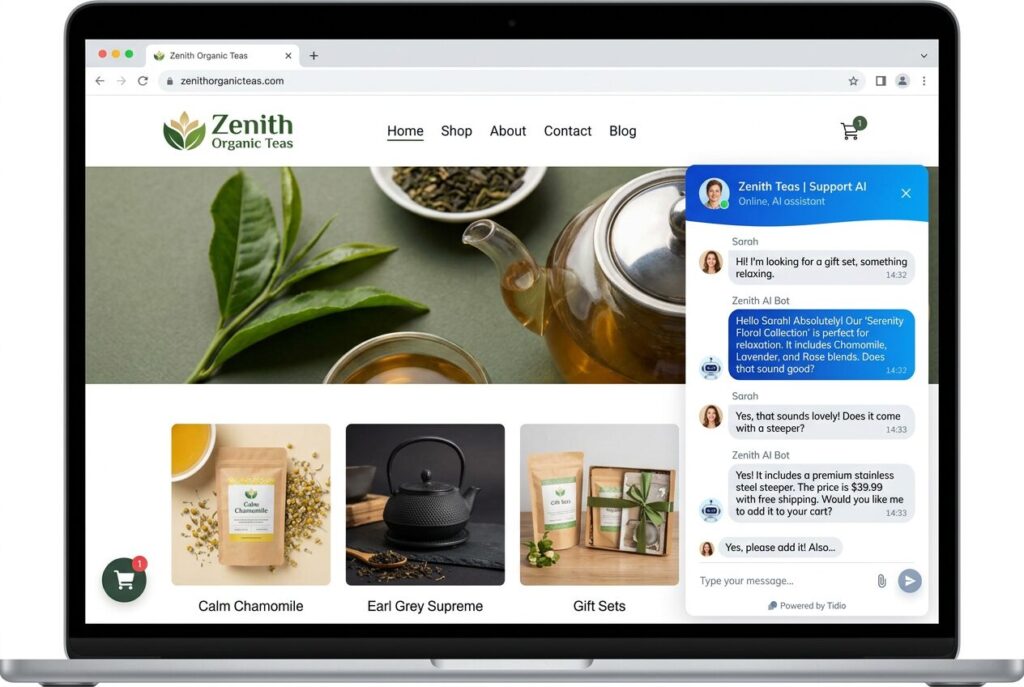
Every minute your website is live without a way for visitors to ask questions is a conversion opportunity you’re leaving on the table. Tidio’s AI chatbot (powered by Lyro AI) answers the most common customer questions automatically — pricing, shipping, product details, FAQs — and hands off to you only when a question genuinely needs a human response. For a small business owner who can’t monitor live chat 24 hours a day, this is a genuine competitive advantage.
Tidio also combines live chat, email ticketing, and chatbot in one platform, so you’re not managing three separate tools for customer communication. The free plan is generous enough to cover most small businesses just getting started, and the paid tiers scale as you grow.
Detail |
Tidio |
Starting Price |
Free | Starter: $29/month |
Free Tier |
Yes — 50 conversations/month |
Best For |
E-commerce, service businesses, any site with product inquiries |
Key AI Feature |
Lyro AI — handles up to 70% of support queries automatically |
Affiliate Commission |
40% recurring — highest in this list |
Quick Comparison: Best AI tools for small business owners at a Glance
Tool |
Best For |
Free Plan |
Paid From |
Affiliate |
Jasper AI |
Writing & content |
No |
$39/month |
30% recurring |
ChatGPT |
All-purpose AI |
Yes |
$20/month |
Indirect |
Grammarly |
Writing quality |
Yes |
$12/month |
$20/signup |
Notion AI |
Workspace & docs |
Yes |
$8/month |
Ambassador |
ClickUp AI |
Project management |
Yes |
$7/month |
20% recurring |
Canva Pro |
Design & visuals |
Yes |
$13/month |
$36/signup |
Zapier |
Automation |
Yes |
$19.99/month |
25% recurring |
Tidio |
Customer service |
Yes |
$29/month |
40% recurring |
How to Choose the Right AI Tools for Your Small Business
With so many tools available, the biggest mistake is trying to implement all of them at once. A better approach is to identify the single biggest time drain in your business right now and start there.
If you create content regularly: Start with Jasper AI. The ROI on content creation time is almost immediate for any business that blogs, emails customers, or markets on social media.
If you manage a team or multiple projects: ClickUp AI is your priority. The time saved on project admin compounds quickly when you’re managing more than two people.
If you’re a solopreneur doing everything alone: Notion AI plus ChatGPT gives you a complete AI assistant and command centre for under $30 a month total.
If you run an e-commerce or product business: Combine Canva for visuals, Tidio for customer service, and Jasper for product descriptions. This trio covers your three biggest time costs.
If you want everything connected seamlessly: Add Zapier last, once you have at least two other tools in place. It multiplies the value of every other tool you use.
Frequently Asked Questions About AI Tools for Small Business
Are these AI tools safe to use with customer data?
Generally yes, but you should read the data handling policies for any tool you use with sensitive customer information. Jasper AI, Notion, and ClickUp all offer Business tiers with enhanced data privacy controls. Avoid pasting personally identifiable customer data into free-tier AI tools without checking their privacy policies first.
How much should a small business budget for AI tools?
A practical starting budget is $50–100 per month for your first three months. Start with two or three tools and measure the time and money saved before expanding your stack. Most small business owners find that even a $50 monthly AI investment pays back 5–10 times in hours recovered.
Can I use AI tools without any technical skills?
Absolutely. Every tool on this list is designed for non-technical users. If you can use Google Docs and send an email, you have the skills needed to get value from all eight tools listed here. The learning curve for most is under two hours.
Do these tools replace employees?
They don’t replace people — they replace the repetitive, time-consuming tasks that prevent your people (and you) from doing high-value work. Think of them as staff who handle the admin so your team can focus on what actually moves the business forward.
Start With One Tool and Build From There
The businesses gaining the biggest advantage from AI in 2025 aren’t the ones with the largest AI stack — they’re the ones who implemented two or three tools deeply and made them central to how they operate every day.
Pick the single tool on this list that addresses your most painful daily task. Use it consistently for 30 days. Then add the next one. In six months, you’ll look back at how you used to operate and wonder how you ever managed without it.
|
If you’re not sure where to begin, start with Jasper AI — it’s the tool that delivers visible results fastest for the widest range of small businesses. Try Jasper AI free for 7 days: jasper.ai (affiliate link — no credit card required) |
Last modified: June 11, 2026